Tuesday, 26 November 2013

Why clone method not visible in all of our class even we know that Object class is parent of all classes

Why  clone method not visible in all of our class  even we know that Object class is parent of all classes

When a protected member is inherited across package it becomes private member of inherited class

when a protected member is inherited within the same package it becomes default member of inherited class.

→  clone() from Object class is inherited into MyClass across package. Object class is in java.lang package and MyClass is in GoodQuestions package. So clone() method becomes a private member of MyClass class.
That explains why you are unable to access clone() method from TestSingleTon class.

Monday, 25 November 2013

Difference between Hashtable and ConcurrentHashMap and HashMap

Difference between Hashtable and ConcurrentHashMap and HashMap


HashMap
HashTable
ConcurrentHashMap
Not Synchronized
Synchronized
ConcurrentHashMap and CopyOnWriteArrayList implementations provide much higher concurrency while preserving thread safety, with some minor compromises in their promises to caller
Hashmap allow one null key and Multiple null value
Not allow null keys or null values
ConcurrentHashMap do not allow null keys or null values
COLLECTION CLASS
LEGACY CLASSS
COLLECTION CLASS
Works in only Single thread models access
Once the size of hashtable becomes considerable large performance degrade because for iteration it has to be locked for longer duration.
Since ConcurrentHashMap introduced concept of segmentation , how large it becomes only certain part of it get locked to provide thread safety so many other readers can still access map without waiting for iteration to complete.
Not  Loked
Locked on Whole  Map
In Summary ConcurrentHashMap only locked certain portion of Map
You can make HashMap synchronized by wrapping it on Collections.synchornizedMap(HashMap) which will return a collection which is almost equivalent to Hashtable, where every modification operation on Map is locked on Map object

while in case of ConcurrentHashMap, thread-safety is achieved by dividing whole Map into different partition based upon Concurrency level and only locking particular portion instead of locking whole Map. by default  size is 16
HashMap only slightly better. in Single thread Environment
bad performance
ConcurrentHashMap is more scalable and performs better than Synchronized HashMap in multi-threaded environment
Collections.synchronizedMap and Collections.synchronizedList, provide a basic conditionally thread-safe implementation of Map and List. However, several factors make them unsuitable for use in highly concurrent applications  for example their single collection-wide lock is an impediment to scalability and it often becomes necessary to lock a collection for a considerable time during iteration to prevent ConcurrentModificationException.


Does not maintain Insertion order
it maintain Insertion order


Reference :-


Friday, 8 November 2013

Difference between getAttribute() and getParameter()

Difference between getAttribute() and getParameter()


SR
getAttribute()
getParameter()
1
The getAttribute() method always returns you an object
.getParameter() method always returns an string.
2
A "parameter" is a name/value pair sent from the client to the server - typically, from an HTML form. Parameters can only have String values. Sometimes (e.g. using a GET request) you will see these encoded directly into the URL (after the ?, each in the form name=value, and each pair separated by an &). Other times, they are included in the body of the request, when using methods such as POST.

using request.setAttribute(). You can add any type of object you like here, Strings, Custom objects, in fact any object. You add the attribute to the request and forward the request to another resource, the client does not know about this. So all the code handling this would typically be in JSP/servlets. You can use request.setAttribute() to add extra-information and forward/redirect the current request to another resource.
3
An "attribute" is a server-local storage mechanism - nothing stored in scoped attribues is ever transmitted outside the server unless you explicitly make that happen. Attributes have String names, but store Object values. Note that attributes are specific to Java (they store Java Objects),
while parameters are platform-independent (they are only formatted strings composed of generic bytes).
4
There are four scopes of attributes in total: "page" (for JSPs and tag files only), "request" (limited to the current client's request, destroyed after request is completed), "session" (stored in the client's session, invalidated after the session is terminated), "application" (exist for all components to access during the entire deployed lifetime of your application).

The bottom line is: use parameters when obtaining data from the client, use scoped attributes when storing objects on the server for use internally by your application only.
5
the servlet/jsp sets and reads attributes for communicating among themselves
Typically, parameters are send by the user browser via HTTP GET/POST,

Difference between forward and sendRedirect

Difference between forward and sendRedirect


SR
sendRedirect
forward
1
sendRedirect() sends a redirect response back to the client's browser. The browser will normally interpret this response by initiating a new request to the redirect URL given in the response
forward() does not involve the client's browser. It just takes browser's current request, and hands it off to another servlet/jsp to handle. The client doesn't know that they're request is being handled by a different servlet/jsp than they originally called.
2
If you want the browser to initiate a new request to a different servlet/jsp, or if the servlet/jsp you want to forward to is not in the same web application, use sendRedirect().
if you want to hide the fact that you're handling the browser request with multiple servlets/jsp, and all of the servlets/jsp are in the same web application, use forward() or include().
3
This is happend at Client Side .
This happened in Server side
4
In this case existing request and response are lost
In this case existing request and response are  preserve
5
in redirect, you can see the redirected address.
In forward, you will not see the forwarded address (since the browser is not involved)

When can we use forward and when can we use sendRedirect?

Technical scenario: redirect should be used
  1. If you need to transfer control to different domain
  2. To achieve separation of task.
For example, database update and data display can be separated by redirect. Do the PaymentProcess and then redirect to displayPaymentInfo. If the client refreshes the browser only the displayPaymentInfo will be done again and PyamenProcess will not be repeated. But if you use forward in this scenario, both PaymentProcess and displayPaymentInfo will be re-executed sequentially, which may result in incosistent data.

Thursday, 7 November 2013

static and dynamic inDifference between JSP include directive and JSP include actionclude

Difference between JSP include directive and JSP include action


SR
(Dynamic Include)
(Static Include)
1
The syntax for dynamic include is <jsp:include page="file.jsp”/>
The syntax for static include is <%@ include file=”file.jsp” %>
2
<jsp:include page=”relativeURL” /> is the JSP include action element.
The jsp:include action element is like a function call. At runtime, the included file will be ‘executed’ and the result content will be included with the soure JSP page. When the included JSP page is called, both the request and response objects are passed as parameters.
JSP include directive.
At JSP page translation time, the content of the file given in the include directive is ‘pasted’ as it is, in the place where the JSP include directive is used. Then the source JSP page is converted into a java servlet class. The included file can be a static resource or a JSP page. Generally JSP include directive is used to include header banners and footers.
3
dynamic includes is slower
Static includes are faster than dynamic includes
4
Dynamic include would throw a Page not found (HTTP Error 404), if the resource is not available at run time.
In static include if the resource is not available, the container would throw an internal server error (500).Once the page is compiled, even if the resource is not available, static include would work as expected. This is because the resource is already a part of the main file and it will not look for the file at run time.


5
dynamic include is more efficient for dynamic content
Static includes are more efficient for static content
6
dynamic include can accept a parameter.


<jsp:include page="/index.jsp">
 <jsp:param name="name" value="sos" />
</jsp:include>

Static include cannot accept a parameter
7
all thing here checked at Run time
The JSP compilation procedure is that, the source JSP page gets compiled only if that page has changed. If there is a change in the included JSP file, the source JSP file will not be compiled and therefore the modification will not get reflected in the output.

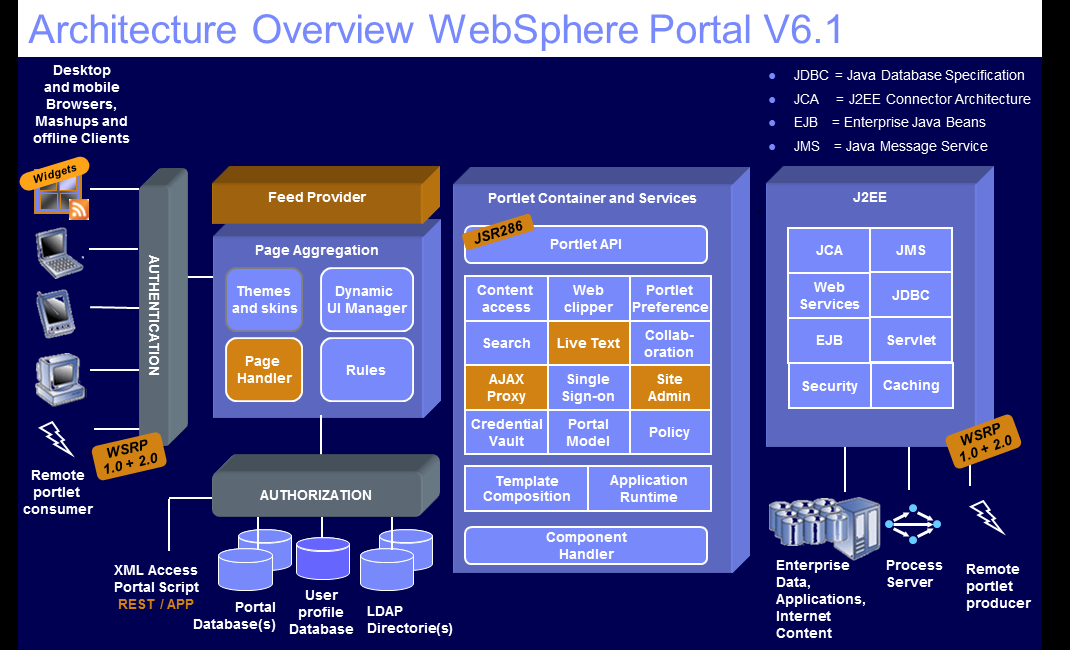
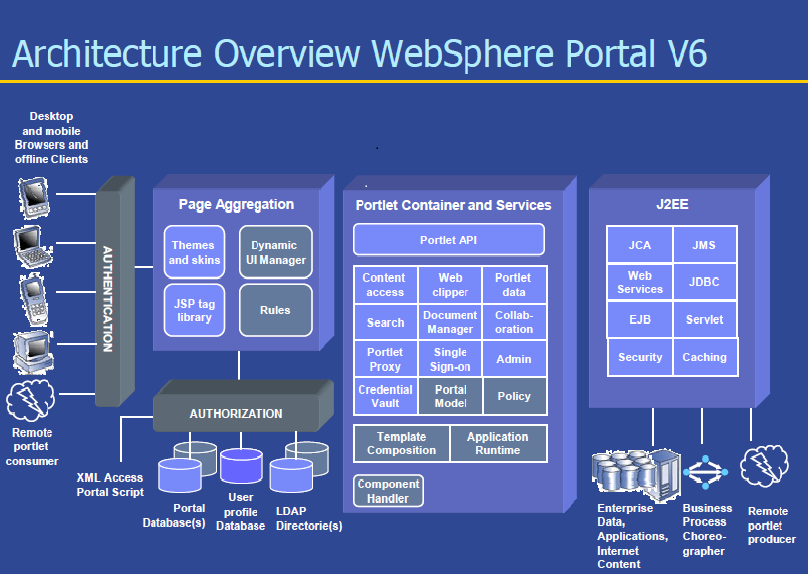
IBM WebSphere Portal Architecture

IBM WebSphere Portal Architecture


Note:-If some body have  Other version Architecture Image or some information please send it to me at venktesh.dwivedi@gmail.com

Very Impotent Links for Java and Portal development development

Jar Download for Spring  Maven Or Gradel Dependency for Spring